
Practical website QA for agencies
How to read a website QA report
By ReleaseCheck Desk | Tyasi LLC · Reviewed October 27, 2026
Read a website QA report in this order: coverage, effect on the release, reproducible findings, supporting evidence and retest status. A useful report lets another person repeat what was observed and understand the limits of the verdict.
The worked example below uses ReleaseCheck Desk's owned synthetic sample. Its defect was deliberately planted. It is not a customer report, testimonial or evidence that a paid client delivery has happened.
Read the coverage before the verdict
A verdict only applies to the URLs, journeys, versions and conditions listed in the report. Look for exact routes, the steps followed, the observation date, browser engine and version, and viewport dimensions. A report should say what was untested, including authenticated states or downstream actions that were outside scope.
Our sample covers two navigation journeys on an owned before/after fixture: home → pricing → Choose sprint → scope preview, and home → Menu → Contact → Return home. It contains no form entry or transaction. Chrome evidence was recorded October 21, 2026, and separate WebKit evidence October 24. Both include 1280 × 900 and 390 × 844 windows. They are separate dated runs, not a claim that both engines ran simultaneously.
Open the original Chrome record and the WebKit record to compare the report with the underlying observations.
Use severity to understand the task impact
Severity describes the observed effect within the agreed review. It is not a prediction of lost revenue or a universal certification scale. A finding that prevents the intended route deserves different attention from a small visual inconsistency. Ask which journey is affected, whether there is a usable alternative and which release decision the agency needs to make.
In this sample, S-01 is marked Major because the pricing call to action reaches the wrong destination. The before verdict is HOLD for journey A. The label does not say that unrelated pages are unusable, and it does not prove that every agency would assign the same business priority.
Repeat the written steps
Worked example S-01
- Open the before fixture home page.
- Select View pricing.
- Select Choose sprint.
- Compare the destination with the expected Sprint scope preview.
The before fixture instead shows Scope preview unavailable. This is the seeded failure. The after fixture follows the corrected route.
A finding should include expected and observed behavior, rather than a screenshot alone. If the result depends on a prior state or a particular size, that belongs in the steps. If you cannot reproduce it, compare the release version, starting URL and conditions before deciding it is resolved.
Open the screenshot and read its context
In the sample, compare the WebKit before screenshot at 390 pixels with the matching retest screenshot. The screenshot supports the destination finding; it does not establish that a payment, email or account action succeeded.
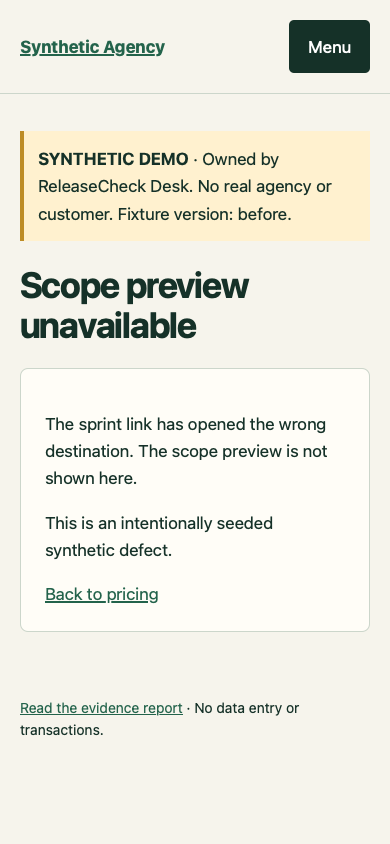
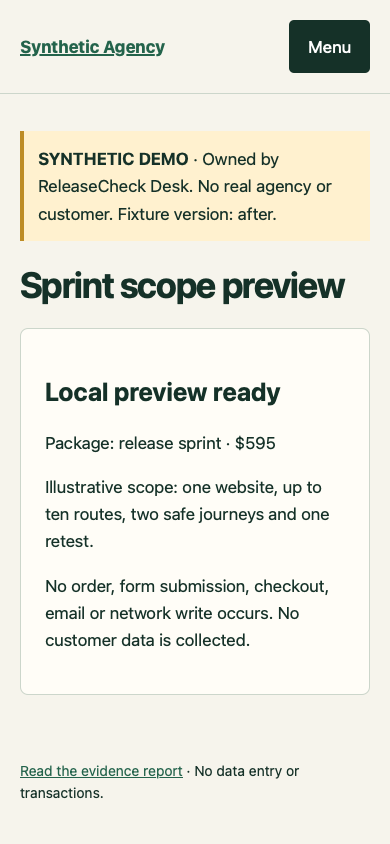
Check that evidence belongs to the stated run and finding. Preserve the timestamp and file reference so a later change does not silently replace the original observation. Client screenshots and findings remain private unless the client has granted written publication permission. The publicly linked evidence here belongs to our own labelled fixture.
Separate engine coverage from real devices
A report should distinguish browser engine, branded application, operating system and viewport. WebKit is the engine used by Safari; a testing build at phone width is not the same as a physical iPhone or the Safari application. Playwright documents its WebKit build. Likewise, Chrome's simulation guidance describes desktop approximation rather than a real-device test.
Ask for evidence of each promised configuration. Do not infer Firefox, a device lab, performance measurement, accessibility certification or a security review from a table that only lists Chrome and WebKit navigation.
Read the retest as a new observation
A correction is verified by repeating the original steps against the updated version. In the after fixture, the pricing route reaches Sprint scope preview, so S-01 is marked verified fixed. The separate menu/contact/return journey also passes in the sample. The after PASS applies to those checked journeys and dimensions; it does not prove the entire website has no defects.
- Resolved: the same steps now produce the expected result in the recorded conditions.
- Still present: the original failure remains observable.
- Untested: the retest could not be completed; a code change alone does not close the finding.
A report with no findings is a valid outcome. Read it as “nothing was found in this coverage,” while retaining the untested areas. Use the report to assign fixes and make an informed release decision, then preserve the final artifact and retest outcome together.
Need a separate review?
ReleaseCheck Desk provides website launch QA for small web agencies. Start with the Free Launch Snapshot request; your agency’s yes and a public URL are enough for ordinary public-page views; broader checks require written site-owner authorization. We confirm coverage and availability before starting. For a larger agreed release, see the Website Launch QA. Current scope, price, turnaround and exclusions are on the offer page.